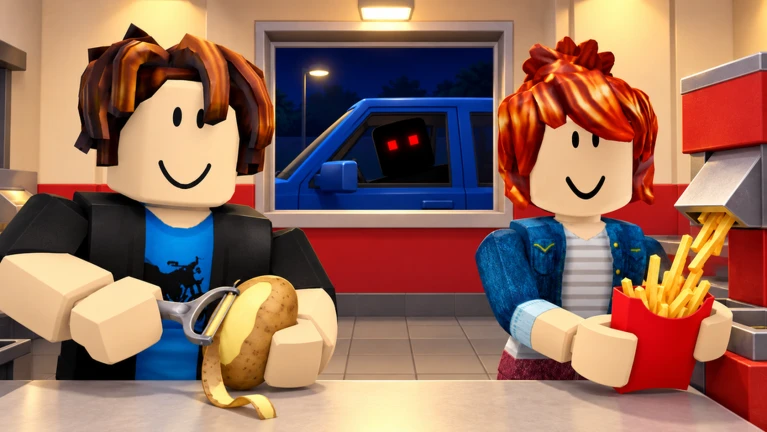

Description
Overflow is a feature-packed Sell Fries! [Anomaly] script for Roblox that automates kitchen tasks, customer service, upgrades, and game progression. It includes instant peeling, automatic cooking, anomaly detection, basement tools, and movement options to help simplify gameplay.
Key Features
Kitchen Automation
- Auto Kitchen: Automates potato collection, peeling, frying, and drive-thru service.
- Instant Peel: Peels potatoes instantly.
- Fast Peel & Scrub Peel: Offers alternative peeling modes with adjustable settings.
- Auto Cook & Collect: Cooks fries and collects ready food.
- Auto Serve & Pickup: Handles drive-thru orders and dropped food.
- Auto Stockpile: Keeps a configurable supply of fries ready.
- Pile Cleaner: Collects and dumps raw potatoes.
Anomaly Detection & Safety
- Anomaly ESP: Shows anomaly locations, states, and distances.
- Drive-Thru ESP: Displays customer visit status and suspicious-customer indicators.
- Auto Shutter: Handles possessed drive-thru customers.
- Night Retreat: Returns inside at night or when an anomaly approaches.
- Stay Inside at Night: Avoids trips to potato piles after dark.
- Auto Fix Power: Automates the power-box wire puzzle.
Basement & Movement Tools
- Auto Basement Key: Collects the basement key and unlocks the door.
- Basement Key ESP: Helps locate the key.
- Auto Basement Entry: Optionally enters the basement.
- Pathfinding Movement: Walks to destinations automatically.
- Teleport Movement: Teleports with arrival checks.
- Noclip, Infinite Jump & Fly: Provides additional movement options.
Purchases & Upgrades
- Auto Buy Tools, Upgrades & Machines: Automates selected purchases.
- Purchase Priorities: Choose which items to buy first.
- Cash & Gem Reserves: Set minimum amounts to keep.
- Auto Merchant: Purchases selected merchant items.
- Auto Use Boosts: Uses Money Potion and Cola when their boosts expire.
- Auto Morning Perks: Selects a preferred available perk.
- Permanent Upgrades: Purchases selected upgrades with gems.
Queues, Rewards & Progression
- Auto Join Queue: Supports team sizes from one to four.
- Party Options: Join open parties or create friends-only queues.
- Hard Mode: Selects Hard Mode when unlocked.
- Auto Rejoin: Accepts available rejoin offers.
- Auto Claim Achievements: Collects completed achievement rewards.
- Free Wheel Spin: Automates free spins.
- Auto Roll Class: Uses free rolls and class tokens, with optional gem rolls and stopping rules.
- Auto Return to Lobby: Returns to the lobby when a run ends.
Extra Features
- Instant Interact: Speeds up interactions.
- Anti-AFK: Helps prevent inactivity.
- Walk Speed, Jump Power & Hip Height: Adjusts movement settings.
- No Rendering & FPS Cap: Offers graphics and performance controls.
- Server Hop, Join Small Server & Rejoin: Provides server management tools.
- Stop All Automation: Stops automated tasks.
- Configuration Support: Supports Nova configuration and saving settings.
- Draggable Interface: Includes seven tabs and configurable interface options.
Script Information
- Script Name: Overflow Auto Kitchen, Auto Peel, Instant Peel & More
- Hub: Overflow
- Supported Game: Sell Fries! [Anomaly]
- Execution: Direct Execute
- Key System: Uses a key system.
- Status: Marked as working by the source listing, with 3 positive reports and no negative reports in the last two weeks. The listing also flags it as patched/detected, so current compatibility is uncertain.
Views
0+
Likes
0
Dislikes
0
Posted
3 days ago
Updated
3 days ago
Key System
Yes
Mobile
Supported
Script Preview
loadstring(game:HttpGet("https://overflow.cx/loader.lua"))()How to Use This Script
1
Open Your Executor
Launch a supported executor and attach it to a running Roblox session.
2
Copy the Script
Click the Copy button above. The full loadstring is placed on your clipboard instantly.
3
Paste & Execute
Paste it into the executor and hit Execute. The hub window opens inside the game.
Features
Compatible Executors
Comments
0Join the discussion about this script.

No comments yet. Be the first to comment!