
Description
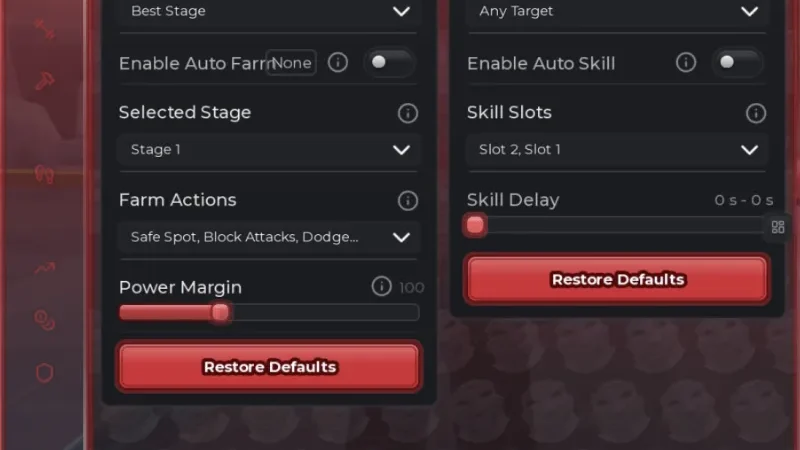
The +1 Forge Blade Loot Script for Roblox is designed for the +1 Forge Blade Loot game by Barrage. It includes several automation features to help with game progression, including Auto Claim, Auto Farm, Auto Train, and Auto Equip.
The script also provides ESP to help identify relevant objects or players during gameplay. It is designed to make farming, training, and managing equipment easier.
A key system is required before using the script, according to the source listing.
Key Features
Auto Farming & Progression
- Auto Farm – Automatically handles farming tasks.
- Auto Train – Automates the training process.
Rewards
- Auto Claim – Automatically claims available rewards.
Equipment
- Auto Equip – Automatically equips available equipment.
ESP & Detection
- ESP – Provides visual detection features for relevant objects or players.
Additional Features
- Much More – The source listing mentions additional features that are not individually specified.
Script Information
- Script Name: Barrage Hub
- Supported Game: +1 Forge Blade Loot
- Key System: Required
- Developer/Hub: Barrage
- Posted By: hawk
- Script Status: Described as fully working by the source listing; not independently verified
Supported Game
+1 Forge Blade Loot
Play +1 Forge Blade Loot on Roblox
Supported Executors
The source listing names these executors:
- Xeno
- Volt
- Potassium
- Wave
- Delta
- Solara
- Opiumware
- Codex
- MacSploit
- Vega X
- Velocity
Script Preview
loadstring(game:HttpGet("https://barrage.cc/loader"))()How to Use This Script
Open Your Executor
Launch a supported executor and attach it to a running Roblox session.
Copy the Script
Click the Copy button above. The full loadstring is placed on your clipboard instantly.
Paste & Execute
Paste it into the executor and hit Execute. The hub window opens inside the game.
Features
Compatible Executors
Similar Scripts
 16
1 week ago
Key System
16
1 week ago
Key System
 4
1 week ago
No Key
4
1 week ago
No Key
 10
3 weeks ago
Key System
10
3 weeks ago
Key System
 8
4 weeks ago
No Key
8
4 weeks ago
No Key
 23
2 weeks ago
Key System
23
2 weeks ago
Key System
 3
13 hours ago
No Key
3
13 hours ago
No Key
Comments
0
No comments yet. Be the first to comment!