
Description
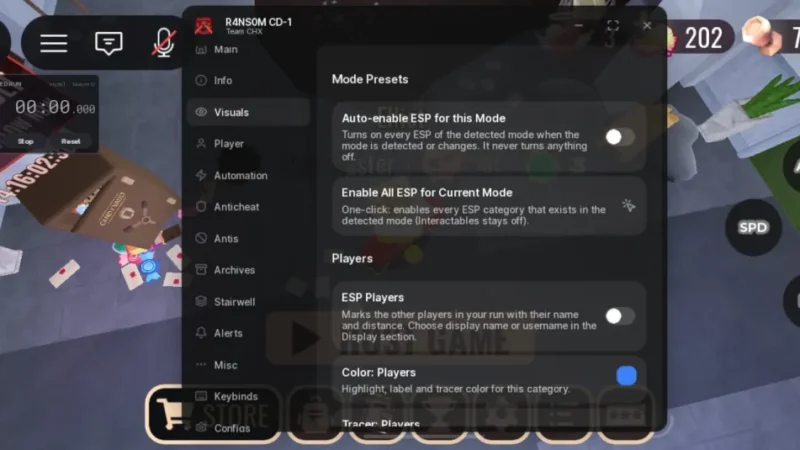
R4NS0M Hub is a feature-rich script hub for DOORS on Roblox, developed by Team CHX. Version 1.0.0 is designed to recognize different game modes and load the relevant features automatically. It includes ESP for items, doors, players, and entities, along with movement settings, automation tools, alerts, and customizable configurations. The listing mentions mobile support and compatibility with Xeno and Delta executors.
Key Features
ESP & Visual Tools
- Door ESP: Highlights doors, locked doors, fake Dupe doors, stairs, and ladders.
- Item ESP: Locates gold, keys, fuses, chests, drawers, lockers, toolboxes, and other items.
- Special Item ESP: Includes separate options for Stardust, Glitch Fragment, Scanner Module, and Lotus Petals.
- Object ESP: Highlights hiding spots, levers, library books, breaker poles, and other interactive objects.
- Entity ESP: Supports 50+ entities, with features filtered by game mode.
- Player ESP: Helps locate other players.
- Custom ESP Settings: Adjust category colors, tracers, distance, text size, fonts, and fill options.
- Mode Presets: Quickly apply presets for the current game mode.
Movement & Player Settings
- Speedhack: Adjusts movement speed.
- Jump Power: Customizes jumping.
- Infinite Jump: Allows repeated jumping.
- Fly: Enables flight functionality.
- Noclip: Allows movement through certain objects.
- Slide: Includes a slide-related movement option.
- Fullbright: Improves visibility in dark areas.
- No Fog: Removes fog effects.
Automation & Interaction
- Instant Proximity Prompts: Speeds up proximity-based interactions.
- Auto Interact: Automates interactions with configurable exclusions.
- Library Code Helper: Includes assistance for the Library puzzle.
- Minecart Helper: Provides automation for minecart sections.
- Dam Seek & Cringle Helpers: Includes mode-specific assistance.
- Auto Heartbeat: Automates the Heartbeat minigame.
- Dedicated Mode Tabs: Provides separate tabs for Archives and Stairwell.
Entity Bypasses & Protection Options
- Entity Bypasser: Includes options designed to handle various entities.
- Anticheat Manipulator: Provides configurable anticheat-related settings.
- Position & Crouch Spoof: Includes position and crouch manipulation options.
- Void Guard: Provides a listed void-protection feature.
- Entity-Specific Bypasses: Includes options for Giggle, Dupe, Eyes, Lookman, Gloombat eggs, Seek obstructions, Vacuum, killbricks, Snare, Banana, Jeff, and other hazards.
- Entity Removal Options: Includes options to remove Screech, Halt, A-90, Dread, Surge, Figure, and more.
- Survival Options: Includes no-damage settings, auto revive, and Figure godmode.
Alerts & Notifications
- Entity Alerts: Displays entity notifications styled like DOORS achievement popups.
- Sound Notifications: Includes sound alerts.
- Entity Filters: Customize which entities trigger notifications.
- Survival Tips: Shows short tips for dealing with specific entities.
- Item & Code Alerts: Provides notifications for items, Library codes, and Ransom-related events.
Customization & Extra Tools
- Rebindable Controls: Customize keys and floating-button controls.
- Mobile Floating Buttons: Provides on-screen controls for mobile devices.
- Save & Load Configs: Store and reuse preferred settings.
- Debug Tools: Copy game information and nearby-object details to help report missing ESP features.
- Automatic Mode Detection: Detects supported modes and adjusts the menu when the mode changes.
Script Information
- Script Name: R4NS0M Hub
- Version: 1.0.0
- Developer: Team CHX
- Supported Game: DOORS
- Key System: The source listing labels it as requiring a key system; requirements may apply.
- Mobile Support: Mentioned in the description.
- Supported Executors: Xeno, Delta
Views
3+
Likes
0
Dislikes
0
Posted
6 days ago
Updated
6 days ago
Key System
Yes
Mobile
Supported
Script Preview
loadstring(game:HttpGet("https://api.obscuravm.com/scripts/2242844724929357263"))()How to Use This Script
1
Open Your Executor
Launch a supported executor and attach it to a running Roblox session.
2
Copy the Script
Click the Copy button above. The full loadstring is placed on your clipboard instantly.
3
Paste & Execute
Paste it into the executor and hit Execute. The hub window opens inside the game.
Features
Compatible Executors
Comments
0Join the discussion about this script.

No comments yet. Be the first to comment!