

Description
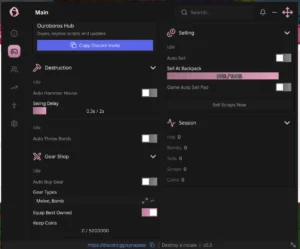
The Roll A Stickman Script features Ouroboros Hub with keyless access and automation tools for rolling, upgrading, and progressing through the game. It includes Auto Roll, Auto Level Up All, Auto Equip Best, Auto Open Packs, Auto Buy Upgrades, and automatic quest rewards. Additional features include potion automation, battle speed controls, Fly, NoClip, Infinite Jump, FPS Boost, and Anti-AFK, with the source listing support for Delta and Xeno.
Key Features
-
No Key Required
-
Auto Claim Quests
-
Auto Buy Upgrades
-
Auto Open Reward Cards
-
Auto Level Up All
-
Auto Claim Roll Pass
-
Auto Roll
-
Auto Claim Daily Reward
-
Auto Set Battle Speed
-
Auto Equip Best
-
Auto Drink Potions
-
Auto Claim Gifts
-
Auto Open Packs
-
NoClip
-
Infinite Jump
-
Fly
-
WalkSpeed
-
Disable 3D Rendering
-
Auto Reconnect on Kick
-
FPS Boost
-
Instant ProximityPrompt
-
No Gameplay Paused
-
Anti-AFK
-
More Features Included

Script Preview
loadstring(game:HttpGet("https://raw.githubusercontent.com/joustingmatch/Ouroboros/main/loader.lua"))()How to Use This Script
Open Your Executor
Launch a supported executor and attach it to a running Roblox session.
Copy the Script
Click the Copy button above. The full loadstring is placed on your clipboard instantly.
Paste & Execute
Paste it into the executor and hit Execute. The hub window opens inside the game.
Features
Compatible Executors
Similar Scripts
 3
1 day ago
Key System
3
1 day ago
Key System
 12
3 weeks ago
No Key
12
3 weeks ago
No Key
 49
2 weeks ago
No Key
49
2 weeks ago
No Key
 0
4 hours ago
No Key
0
4 hours ago
No Key
 8
1 week ago
Key System
8
1 week ago
Key System
 6
4 weeks ago
No Key
6
4 weeks ago
No Key
Comments
0
No comments yet. Be the first to comment!