
Description
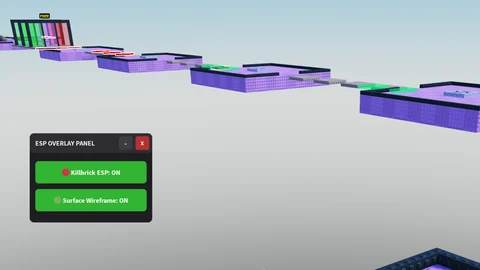
Universal KillBrick is a simple script designed for Roblox obstacle courses and other games where hidden surfaces or dangerous parts may be difficult to see. It provides ESP features for invisible surfaces and killbricks, along with a movable GUI that is easy to open and close.
Key Features
ESP Features
- Invisible Surface ESP
- KillBrick ESP
- Hidden Surface Detection
- Helps Identify Dangerous Parts
- Useful for Obby Games
GUI Features
- Draggable GUI
- Close Button
- Minimize Button
- Easy-to-Use Interface
- Delete Key to Open or Close the GUI
- Customizable GUI Toggle Key
Supported Games
- Universal Roblox Games
- Obby Games
- Games with KillBricks or Hidden Surfaces
- More compatible games may be supported depending on the game setup
Views
12+
Likes
0
Dislikes
0
Posted
3 weeks ago
Updated
3 weeks ago
Key System
No
Mobile
Supported
Script Preview
-- LocalScript inside StarterPlayerScripts
local Workspace = game:GetService("Workspace")
local Players = game:GetService("Players")
local UserInputService = game:GetService("UserInputService")

local localPlayer = Players.LocalPlayer
local playerGui = localPlayer:WaitForChild("PlayerGui")

-----------------------------------------
-- CONFIGURATION
-----------------------------------------
-- Change "Delete" to any key you want (e.g., Enum.KeyCode.V)
local TOGGLE_KEY = Enum.KeyCode.Delete

-----------------------------------------
-- STATE DATA
-----------------------------------------
local killbrickESPActive = false
local surfaceESPActive = false
local isMinimized = false

-----------------------------------------
-- UI CREATION
-----------------------------------------
local screenGui = Instance.new("ScreenGui")
screenGui.Name = "ESPControlMenu"
screenGui.ResetOnSpawn = false
screenGui.Parent = playerGui

-- Main Container Frame
local mainFrame = Instance.new("Frame")
mainFrame.Name = "MainFrame"
mainFrame.Size = UDim2.new(0, 220, 0, 160)
mainFrame.Position = UDim2.new(0, 20, 0, 20)
mainFrame.BackgroundColor3 = Color3.fromRGB(30, 30, 35)
mainFrame.BorderSizePixel = 0
mainFrame.Active = true
mainFrame.Draggable = true -- Drag via title bar or main frame
mainFrame.Parent = screenGui

local uiCorner = Instance.new("UICorner")
uiCorner.CornerRadius = UDim.new(0, 8)
uiCorner.Parent = mainFrame

-- Title Banner
local titleLabel = Instance.new("TextLabel")
titleLabel.Name = "TitleLabel"
titleLabel.Size = UDim2.new(1, 0, 0, 35)
titleLabel.BackgroundColor3 = Color3.fromRGB(45, 45, 50)
titleLabel.Text = "ESP OVERLAY PANEL"
titleLabel.TextColor3 = Color3.fromRGB(240, 240, 240)
titleLabel.Font = Enum.Font.SourceSansBold
titleLabel.TextSize = 14
titleLabel.TextXAlignment = Enum.TextXAlignment.Left
titleLabel.Position = UDim2.new(0, 0, 0, 0)
titleLabel.Parent = mainFrame

-- Padding for text inside Title
local padding = Instance.new("UIPadding")
padding.PaddingLeft = UDim.new(0, 10)
padding.Parent = titleLabel

local titleCorner = Instance.new("UICorner")
titleCorner.CornerRadius = UDim.new(0, 8)
titleCorner.Parent = titleLabel

-- Minimize Button (-)
local minimizeBtn = Instance.new("TextButton")
minimizeBtn.Name = "MinimizeButton"
minimizeBtn.Size = UDim2.new(0, 25, 0, 25)
minimizeBtn.Position = UDim2.new(1, -60, 0, 5)
minimizeBtn.BackgroundColor3 = Color3.fromRGB(60, 60, 65)
minimizeBtn.Text = "-"
minimizeBtn.TextColor3 = Color3.fromRGB(240, 240, 240)
minimizeBtn.Font = Enum.Font.SourceSansBold
minimizeBtn.TextSize = 16
minimizeBtn.BorderSizePixel = 0
minimizeBtn.Parent = titleLabel

local minCorner = Instance.new("UICorner")
minCorner.CornerRadius = UDim.new(0, 4)
minCorner.Parent = minimizeBtn

-- Close Button (X)
local closeBtn = Instance.new("TextButton")
closeBtn.Name = "CloseButton"
closeBtn.Size = UDim2.new(0, 25, 0, 25)
closeBtn.Position = UDim2.new(1, -30, 0, 5)
closeBtn.BackgroundColor3 = Color3.fromRGB(180, 50, 50)
closeBtn.Text = "X"
closeBtn.TextColor3 = Color3.fromRGB(255, 255, 255)
closeBtn.Font = Enum.Font.SourceSansBold
closeBtn.TextSize = 12
closeBtn.BorderSizePixel = 0
closeBtn.Parent = titleLabel

local closeCorner = Instance.new("UICorner")
closeCorner.CornerRadius = UDim.new(0, 4)
closeCorner.Parent = closeBtn

-- Content Window (Holds the toggles so they hide when minimized)
local contentFrame = Instance.new("Frame")
contentFrame.Name = "ContentFrame"
contentFrame.Size = UDim2.new(1, 0, 1, -35)
contentFrame.Position = UDim2.new(0, 0, 0, 35)
contentFrame.BackgroundTransparency = 1
contentFrame.BorderSizePixel = 0
contentFrame.Parent = mainFrame

-- Helper function to stylize toggle buttons
local function createToggleButton(name, text, positionY)
	local button = Instance.new("TextButton")
	button.Name = name
	button.Size = UDim2.new(1, -20, 0, 40)
	button.Position = UDim2.new(0, 10, 0, positionY)
	button.BackgroundColor3 = Color3.fromRGB(200, 50, 50)
	button.Text = text .. ": OFF"
	button.TextColor3 = Color3.fromRGB(255, 255, 255)
	button.Font = Enum.Font.SourceSansBold
	button.TextSize = 14
	button.BorderSizePixel = 0
	button.Parent = contentFrame

	local btnCorner = Instance.new("UICorner")
	btnCorner.CornerRadius = UDim.new(0, 6)
	btnCorner.Parent = button

	return button
end

local killbrickBtn = createToggleButton("KillbrickToggle", "🔴 Killbrick ESP", 15)
local surfaceBtn = createToggleButton("SurfaceToggle", "🟢 Surface Wireframe", 65)

-----------------------------------------
-- ESP RENDERING MANAGEMENT
-----------------------------------------
local function updateKillbrickESP(part)
	local existing = part:FindFirstChild("KillBrickESP")
	if killbrickESPActive then
		if not existing then
			local highlight = Instance.new("Highlight")
			highlight.Name = "KillBrickESP"
			highlight.FillColor = Color3.fromRGB(255, 0, 0)
			highlight.FillTransparency = 0.5
			highlight.OutlineColor = Color3.fromRGB(255, 255, 255)
			highlight.OutlineTransparency = 0
			highlight.DepthMode = Enum.HighlightDepthMode.AlwaysOnTop
			highlight.Parent = part
		end
	else
		if existing then existing:Destroy() end
	end
end

local function updateSurfaceESP(part)
	local existing = part:FindFirstChild("SurfaceMeshESP")
	if surfaceESPActive then
		if not existing then
			local boxAdornment = Instance.new("BoxHandleAdornment")
			boxAdornment.Name = "SurfaceMeshESP"
			boxAdornment.Size = part.Size
			boxAdornment.Color3 = Color3.fromRGB(0, 255, 127)
			boxAdornment.Transparency = 0.4
			boxAdornment.Adornee = part
			boxAdornment.AlwaysOnTop = true
			boxAdornment.ZIndex = 10
			boxAdornment.Parent = part
		end
	else
		if existing then existing:Destroy() end
	end
end

local function runGlobalESPScan()
	local character = localPlayer.Character

	for _, object in pairs(Workspace:GetDescendants()) do
		if object:IsA("BasePart") then
			if character and object:IsDescendantOf(character) then continue end

			local nameLower = string.lower(object.Name)
			local hasKillScript = object:FindFirstChildOfClass("Script") or object:FindFirstChildOfClass("LocalScript")
			if string.find(nameLower, "kill") or string.find(nameLower, "lava") or string.find(nameLower, "deadly") or hasKillScript then
				updateKillbrickESP(object)
			end

			if object.Transparency >= 0.95 and object.CanCollide == true then
				updateSurfaceESP(object)
			end
		end
	end
end

-----------------------------------------
-- WINDOW INTERACTION CONTROLS
-----------------------------------------

-- Minimize functionality
minimizeBtn.MouseButton1Click:Connect(function()
	isMinimized = not isMinimized
	if isMinimized then
		contentFrame.Visible = false
		mainFrame.Size = UDim2.new(0, 220, 0, 35) -- Collapse height to title bar only
		minimizeBtn.Text = "+"
	else
		contentFrame.Visible = true
		mainFrame.Size = UDim2.new(0, 220, 0, 160) -- Expand back to normal
		minimizeBtn.Text = "-"
	end
end)

-- Close Button functionality
closeBtn.MouseButton1Click:Connect(function()
	screenGui.Enabled = false
end)

-- Keyboard shortcut listener (Del Key)
UserInputService.InputBegan:Connect(function(input, gameProcessedEvent)
	-- gameProcessedEvent prevents toggling the menu if you are currently typing in chat
	if gameProcessedEvent then return end

	if input.KeyCode == TOGGLE_KEY then
		screenGui.Enabled = not screenGui.Enabled
	end
end)

-- Toggle Actions
killbrickBtn.MouseButton1Click:Connect(function()
	killbrickESPActive = not killbrickESPActive
	if killbrickESPActive then
		killbrickBtn.BackgroundColor3 = Color3.fromRGB(50, 180, 50)
		killbrickBtn.Text = "🔴 Killbrick ESP: ON"
	else
		killbrickBtn.BackgroundColor3 = Color3.fromRGB(200, 50, 50)
		killbrickBtn.Text = "🔴 Killbrick ESP: OFF"
	end
	runGlobalESPScan()
end)

surfaceBtn.MouseButton1Click:Connect(function()
	surfaceESPActive = not surfaceESPActive
	if surfaceESPActive then
		surfaceBtn.BackgroundColor3 = Color3.fromRGB(50, 180, 50)
		surfaceBtn.Text = "🟢 Surface Wireframe: ON"
	else
		surfaceBtn.BackgroundColor3 = Color3.fromRGB(200, 50, 50)
		surfaceBtn.Text = "🟢 Surface Wireframe: OFF"
	end
	runGlobalESPScan()
end)

-- Continuous background streaming sweep
task.spawn(function()
	while true do
		task.wait(3)
		runGlobalESPScan()
	end
end)
How to Use This Script
1
Open Your Executor
Launch a supported executor and attach it to a running Roblox session.
2
Copy the Script
Click the Copy button above. The full loadstring is placed on your clipboard instantly.
3
Paste & Execute
Paste it into the executor and hit Execute. The hub window opens inside the game.
Features
Similar Scripts
 0
9 hours ago
Key System
0
9 hours ago
Key System
Tower Buyer Script – Gnome Code, Tower Shop & Hidden Towers
Universal
 1
5 days ago
Key System
1
5 days ago
Key System
Xeno Hub Universal Script – 3,700+ Scripts, Multi-Game Support
Universal
 3
7 days ago
Key System
3
7 days ago
Key System
Arcane Hub Script – 100+ Games, 2000+ Features & Universal Script Hub
Universal
 13
1 week ago
No Key
13
1 week ago
No Key
Universal – Samui Script Aimlock, Camlock & FPS Boost, Keyless
Universal
 5
1 week ago
No Key
5
1 week ago
No Key
rsHub Script Hub – Free, Keyless, 16 Roblox Games & Auto Farm
Universal
 5
1 week ago
No Key
5
1 week ago
No Key
Zytra Universal Script – Keyless Silent Aim, Custom Configs & PC Executors
Universal
Comments
0Join the discussion about this script.

No comments yet. Be the first to comment!